Life events
Record the big events here: a wedding, a move, a child's birth, a job change. Each event's card shows which classical techniques were active on that date. The section is visible in both modes.
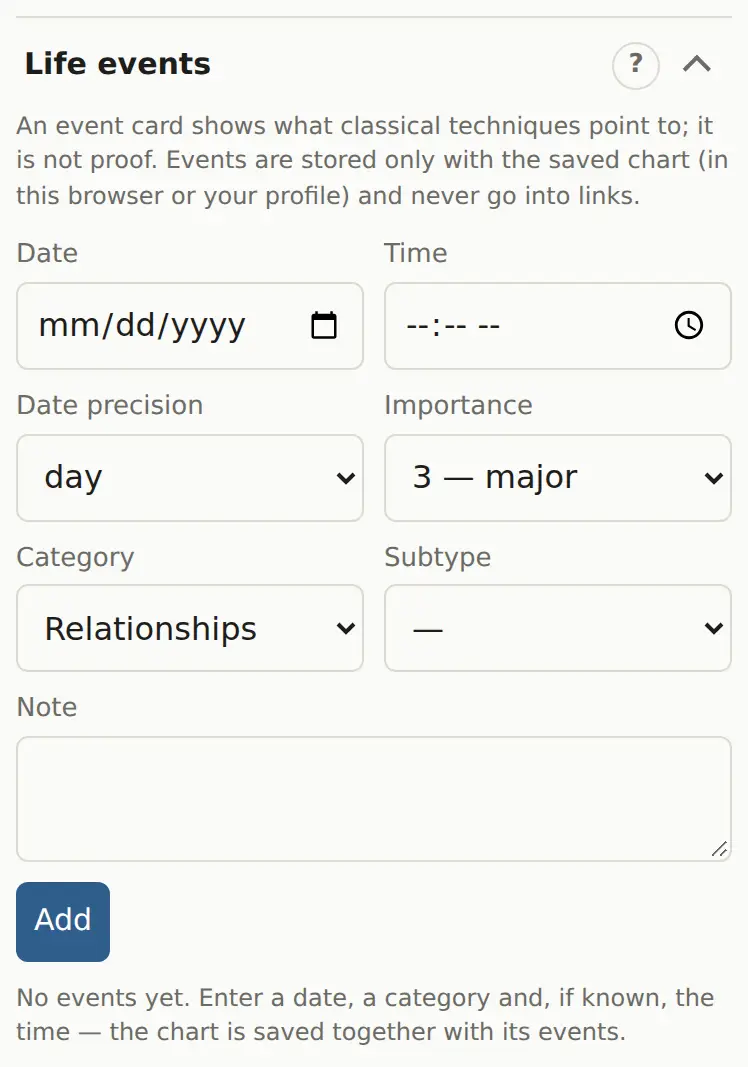
Add an event
- Open “Life events”.
- Set the “Date”. If you only know the month or year, say so in “Date precision”.
- “Time” is available when the precision is “day”.
- “Importance”: 1 minor, 2 notable, 3 major.
- Choose a “Category” and “Subtype”, for example “Move → to another country”.
- Add a “Note” if you like.
- Click “Add”.
If the chart isn't saved yet, it's saved automatically, because events live with a saved chart. The ✎ and ✕ buttons on a row edit and delete the event.
The event card
Tap an event in the list. The card has three parts:
- The natal promise: cusps of the category's houses, their rulers and the planets in them, the significators.
- What was active on the date: firdaria, profection, dasha, primary directions, solar arcs, progressions, transits.
- ✓ marks on rows that involve the rulers of the relevant houses, their cusps, the significators or the category's angle.
The card shows what the techniques point to. It gives no scores or probabilities. Where schools disagree on a category, the alternatives are listed.
Privacy
Events are stored only with the saved chart (in the browser or your profile) and never go into a link. The section is left out of PDFs.
For rectification Pro
In “Rectification: density method”, “Fill from life events” copies events with an exact date and time into the method's list. See Rectification.