Personal forecast and the Today screen
The personal forecast turns transits into days: which day is easy, which is packed, and which hours suit what. It's visible in both modes and sits below the tables (the “Forecast” link in the section bar).
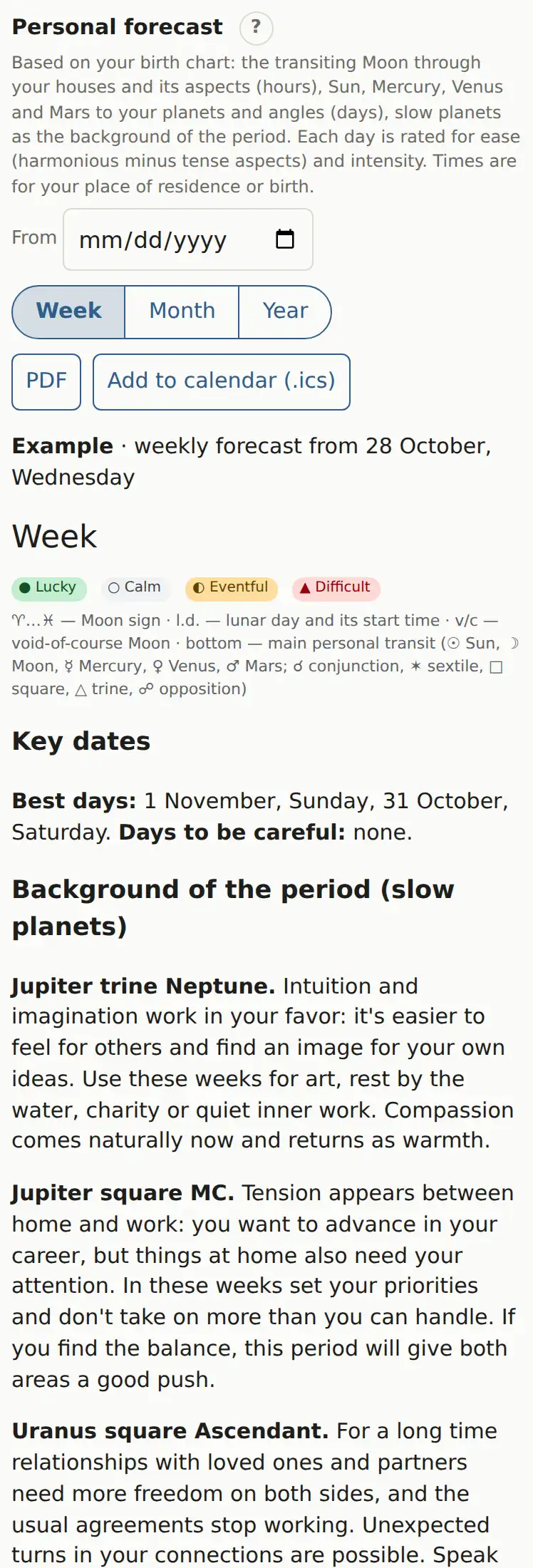
Get a forecast
- Build your chart.
- In “Personal forecast”, optionally choose a start date in “From”. Blank means today.
- Click “Week”, “Month” or “Year”.
What's in it
- A calendar grid: each day carries a rating, the Moon's sign, the lunar day and the main personal transit of the day. “v/c” marks a void-of-course Moon.
- Day ratings: “Lucky”, “Calm”, “Eventful”, “Difficult”.
- “Key dates”: the best days and the days to be careful.
- “Background of the period (slow planets)”: Jupiter through Pluto transits with interpretations. These are themes that last for weeks.
- Day by day: what to do, the best hours and the hours to be careful.
How the rating works
It looks at the transiting Moon through your houses and its aspects (lasting hours), and at the Sun, Mercury, Venus and Mars to your planets and angles (lasting days). Ease of the day: harmonious aspects minus tense ones. Intensity: the total number of aspects. Times are for your place of residence if set, otherwise the birthplace.
PDF and calendar
Once the forecast is built, two buttons appear:
- “PDF”: a printable version;
- “Add to calendar (.ics)”: every day becomes an event with a summary at 8:00 AM, and the best hours and hours to be careful become separate events with reminders.
Month and year forecasts as PDF are also under “Menu → Reports”.
The Today screen
If you mark a chart as “mine” (Saving charts), the app installed on your phone opens straight onto today's forecast. Your morning notification opens the same screen. At the top are “Week”, “Month” and “Full chart”; the last one brings back the normal view with the wheel.
The screen's address is astrodamus.net/?today=1, so you can bookmark it.